User manual

Vekto V18, how to use it and look after it.

Setup, charging, cleaning the filters and the brush roll, and what each error code means. Search for a word, or tap a chapter.

Model V1812 chapters
Line drawing of the Vekto V18 stick vacuum
  1. 01Before you start
  2. 02Know your V18
  3. 03Put it together
  4. 04Charging and the battery
  5. 05Cleaning with it
  6. 06Emptying the dust cup
  7. 07Cleaning the filters
  8. 08Clearing the brush roll
  9. 09Error codes
  10. 10Troubleshooting
  11. 11Safety
  12. 12Specs and recycling
01

Before you start

About ten minutes of setup, plus the first charge.

  1. Give it a full charge first

    The battery ships part-charged, at about 30%, because that is safer for transport. Charge it fully before the first run. From empty, a full charge takes 4 to 5 hours. How to charge

  2. Click it together

    Push the tube into the floor head, then push the body onto the tube. Each joint clicks when it is in. Step by step

  3. Switch it on

    Press the power button in the middle of the round screen. Press it again to switch off. Use – and + beside it to change the mode. The three modes

Check the box

  • 1Vekto V18 body with the round screen
  • 1Detachable battery
  • 1Charger
  • 1LED floor head
  • 1Telescopic tube
  • 12-in-1 brush tool
  • 1Long crevice tool
  • 1Wall charging dock
  • 2Washable HEPA filters, one fitted, one spare
  • 1Printed manual
Tip

Keep the box and its inserts for 60 days. It is the easiest way to send anything back.

02

Know your V18

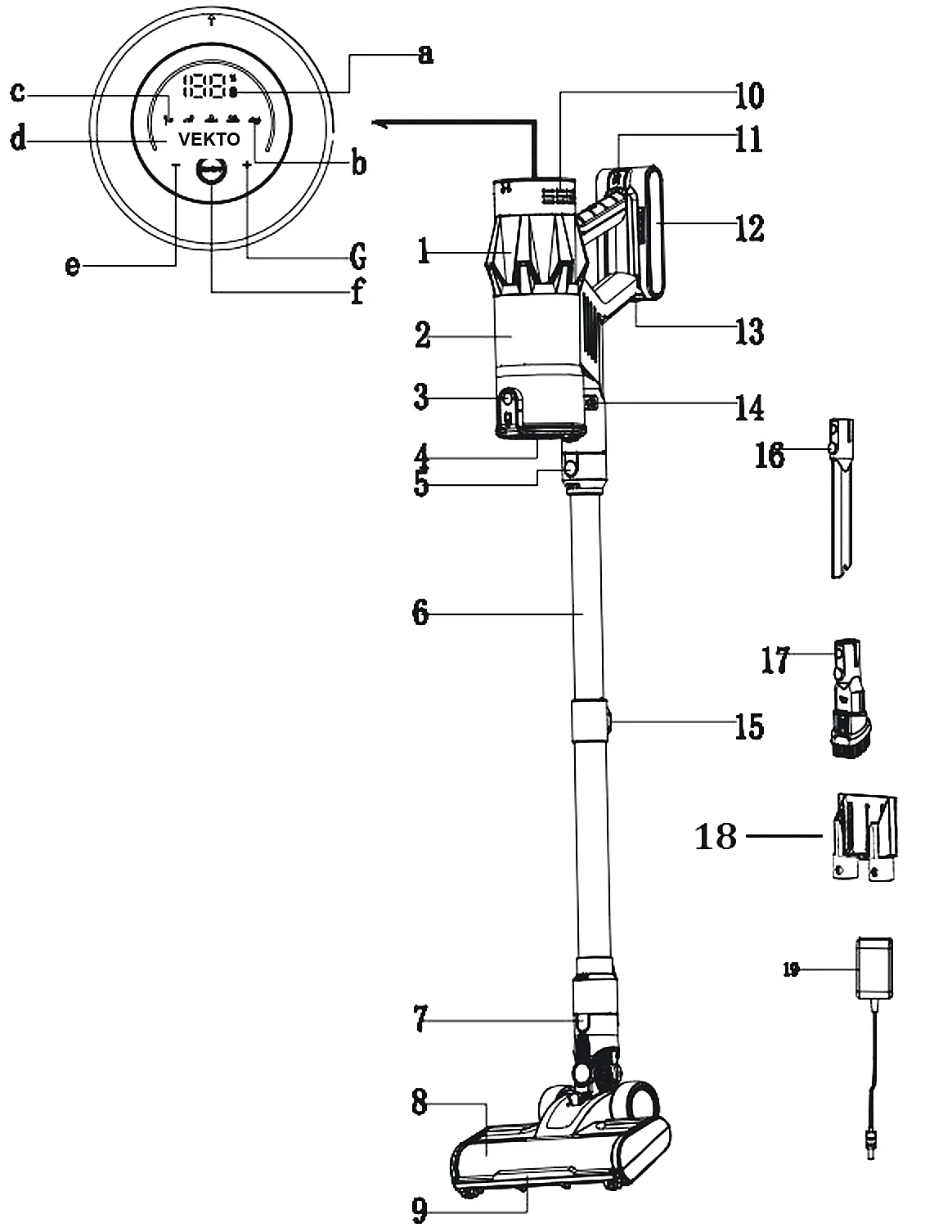
The numbers on this drawing are used all through the manual. Tap it to see it larger.

Labelled drawing of the Vekto V18, parts 1 to 19, with the round screen shown larger, a to g

The machine

  1. 1Motor unit (the body)
  2. 2Dust cup
  3. 3Dust cup empty button
  4. 4Dust cup lid (opens at the bottom)
  5. 5Body release button
  6. 6Telescopic tube
  7. 7Floor head release button
  8. 8LED floor head
  9. 9LED headlight
  10. 10Air outlet
  11. 11Battery release button
  12. 12Battery
  13. 13Charging port
  14. 14Dust cup release button
  15. 15Tube length button
  16. 16Long crevice tool
  17. 172-in-1 brush tool
  18. 18Wall charging dock
  19. 19Charger

The screen

  1. aBattery level
  2. bBrush roll alert
  3. cBlockage alert
  4. dVekto logo
  5. e– (less power)
  6. fPower button
  7. g+ (more power)

If b lights up, something is wound round the brush roll: see chapter 08. If c lights up, something is blocking the air path: see chapter 10.

03

Put it together

No tools. Every joint clicks when it is in.

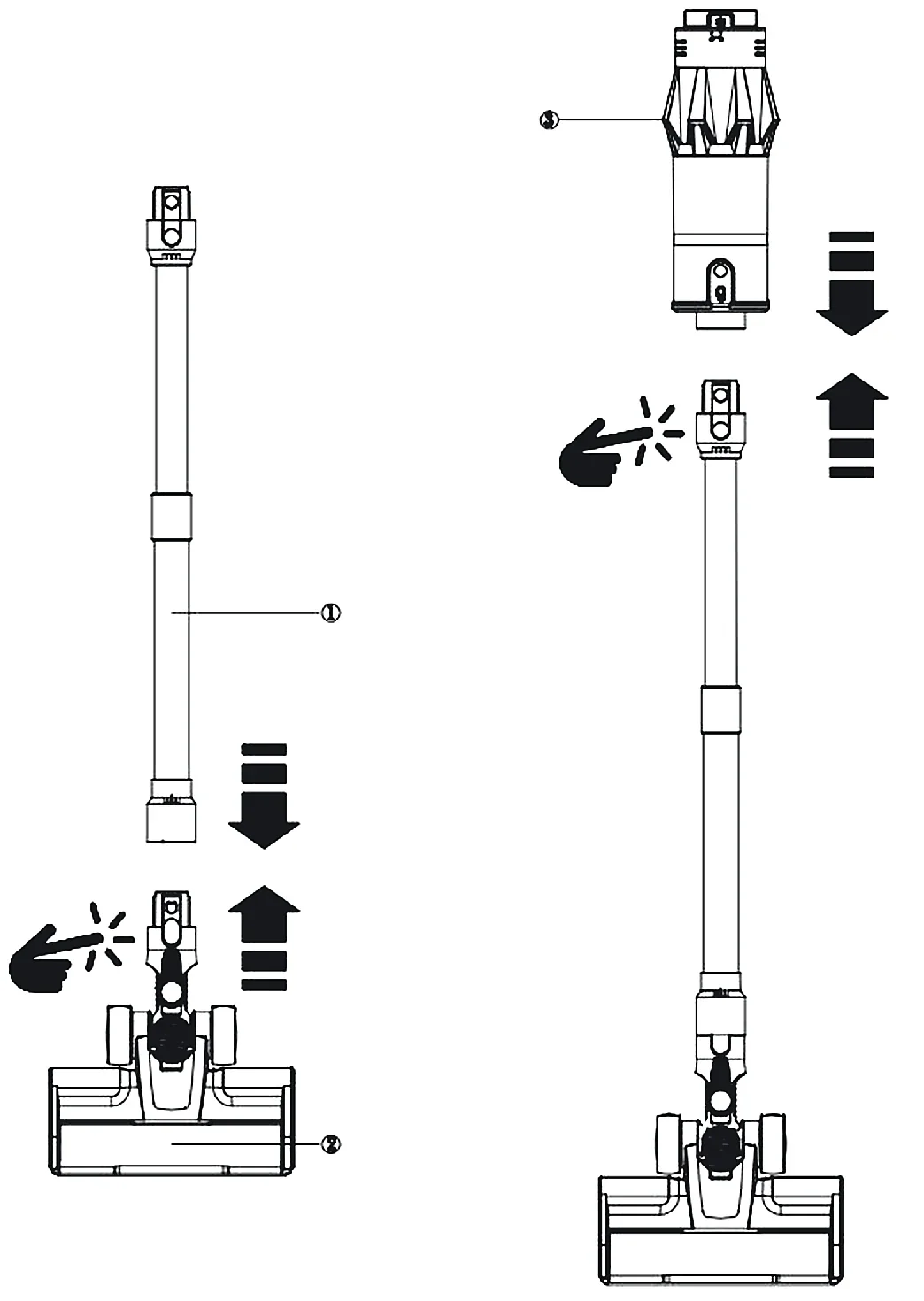
  1. Tube into the floor head

    Push the bottom of the tube into the floor head until it clicks. To take it off, press the floor head release button (7) and pull the tube out.

  2. Body onto the tube

    Push the top of the tube into the body until it clicks. To take it off, press the body release button (5), hold the body and pull.

Drawing: the tube clicks into the floor head, then the body clicks onto the tube

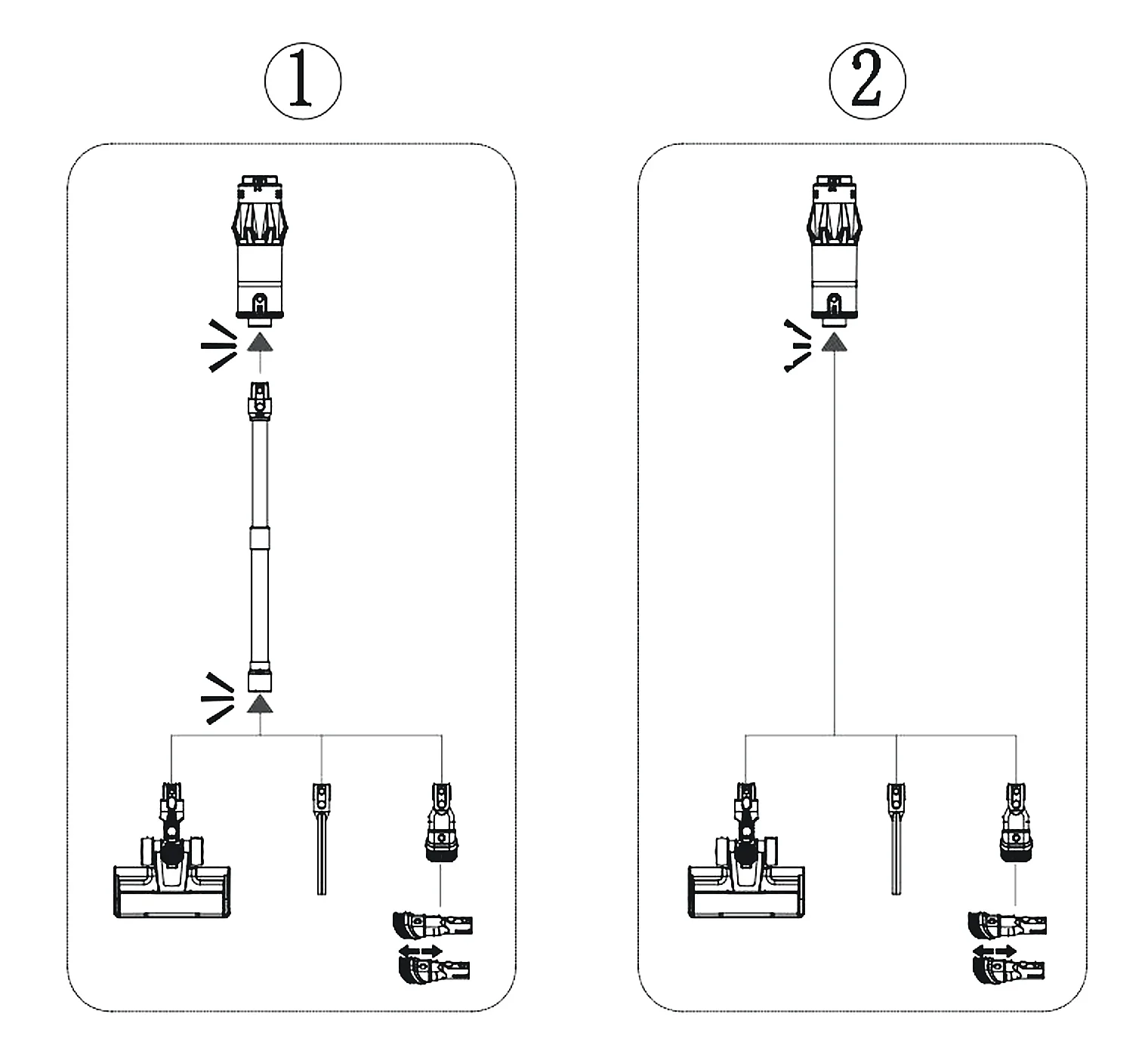
Stick or handheld

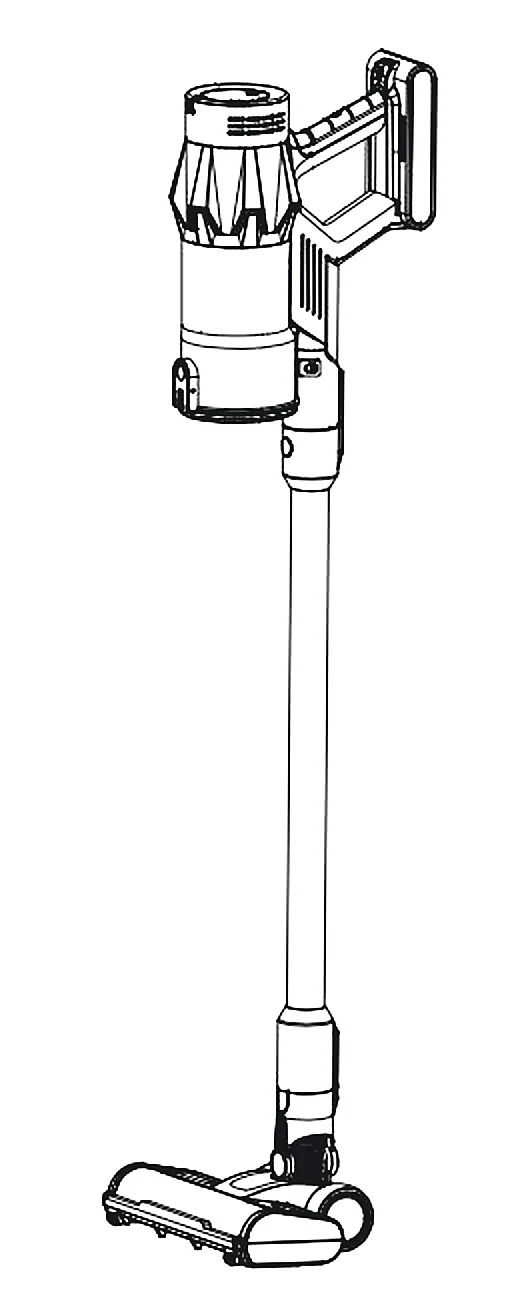
As a stick (1): body, tube, then the floor head or a tool. A tool on the end of the tube reaches high corners and under furniture.

As a handheld (2): take the tube off and put a tool straight onto the body. Use it for stairs, the sofa and the car. The crevice tool reaches down the side of seats. The 2-in-1 tool has a brush that slides out for dusting and back in for a plain nozzle.

Drawing: 1, stick with the tube and the floor head or a tool; 2, handheld with a tool straight on the body

Set the tube to your height

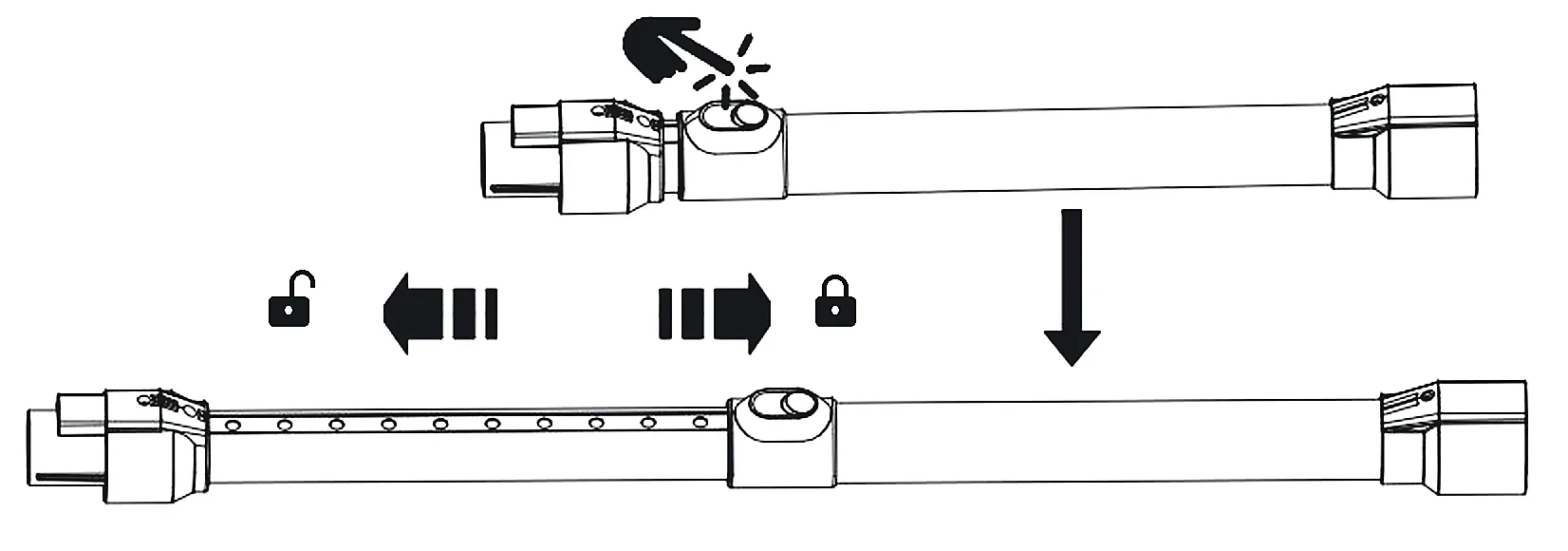
Press the tube length button (15) and slide the tube. Out makes it longer, in makes it shorter. Let go and it locks.

Drawing: press the button on the tube, slide towards the open padlock to lengthen and towards the closed padlock to lock
Open padlock: slide to lengthen. Closed padlock: slide back to shorten and lock.

The wall dock (optional)

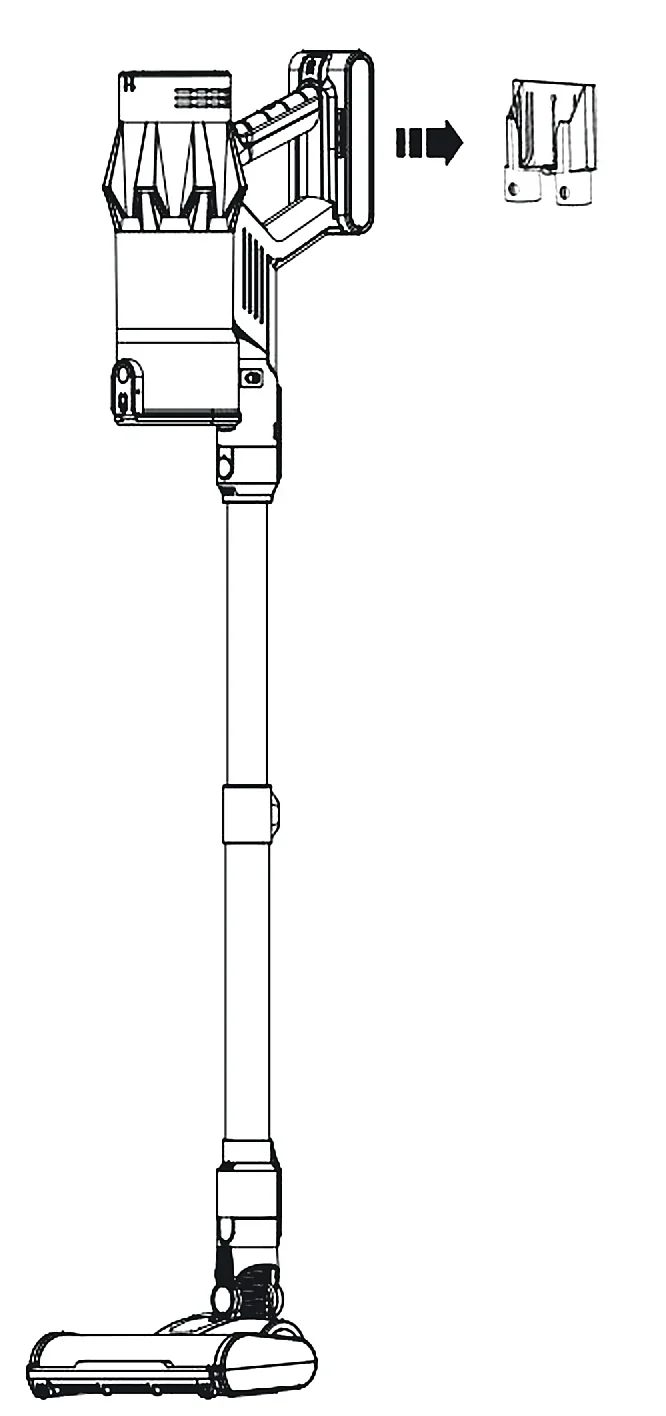
The V18 stands on its own on its floor head, so you do not have to put the dock up. If you want it on the wall, fix the dock with two screws at a height where the vacuum can hang clear of the floor. Hang the vacuum on it by the body. The dock charges it and holds both tools.

Before you drill

Check the wall for hidden pipes and cables.

Drawing: the V18 hanging on its wall dock

04

Charging and the battery

4 to 5 hours from empty. The battery clicks off without tools.

Three ways to charge

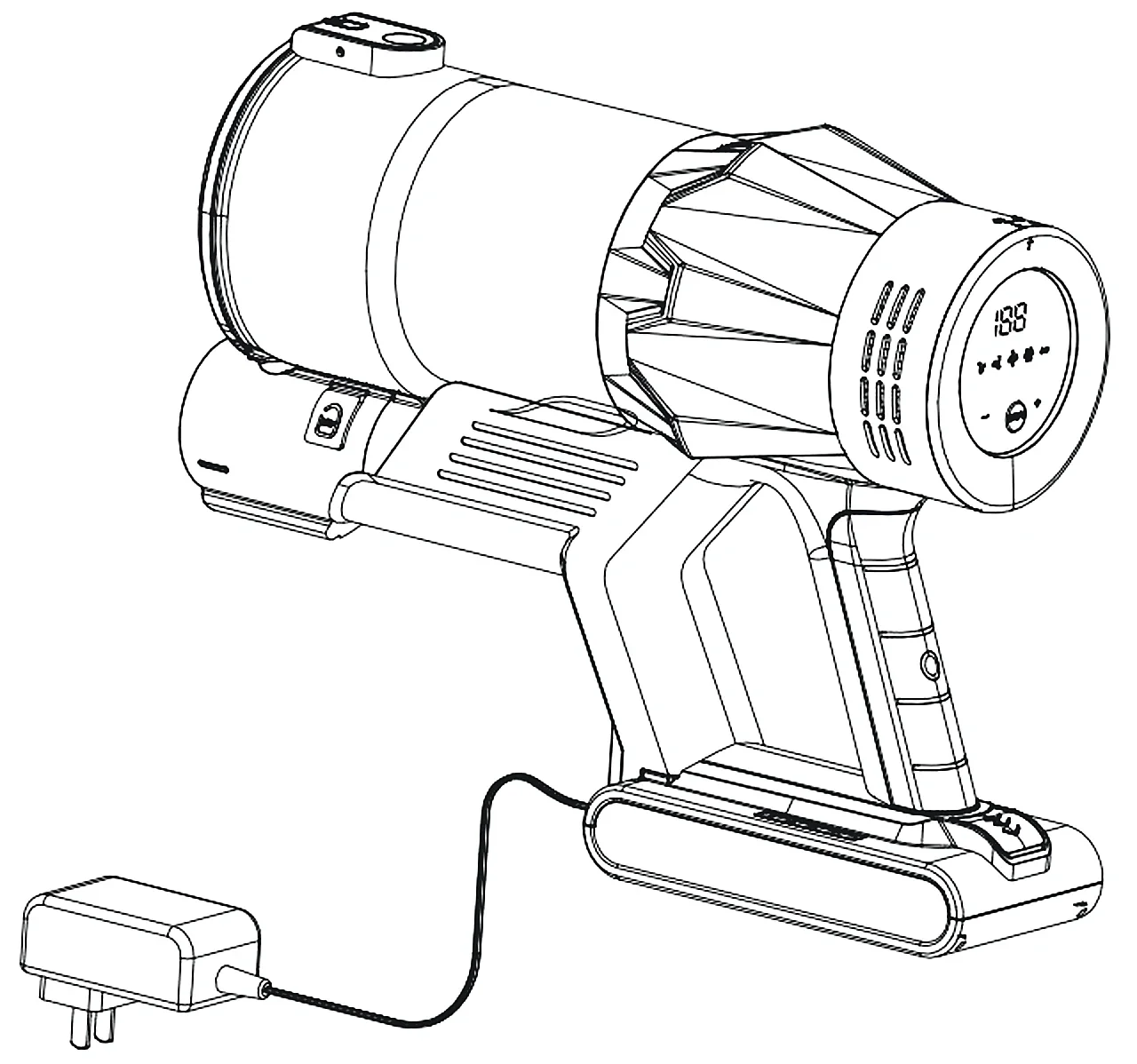
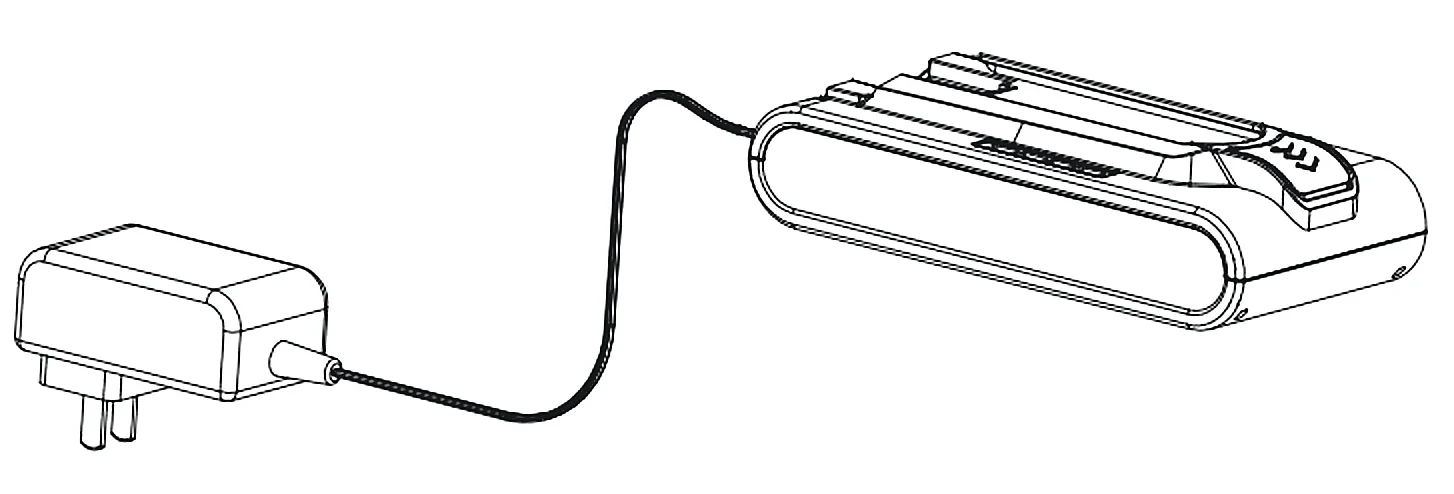
Hang it on the wall dock. Or plug the charger straight into the charging port (13) on the battery, with the battery on the machine. Or take the battery off and charge it on its own.

The screen shows the battery level (a). When the battery runs low, the level blinks. Put it on charge.

Drawing: the charger plugged into the battery while it is on the machine
Battery on the machine.
Drawing: the charger plugged into the battery on its own
Battery on its own.

Take the battery off, or fit it

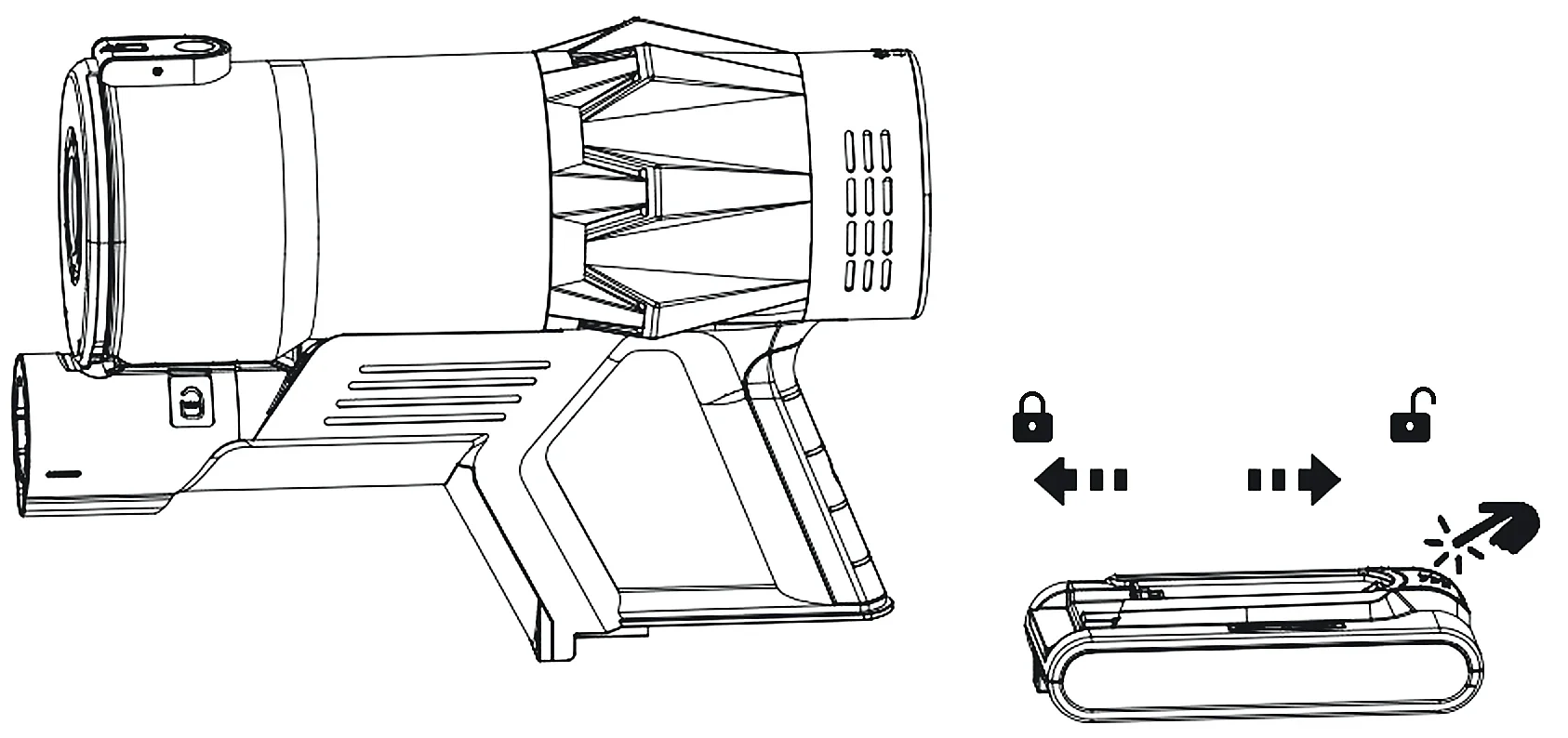
To take it off, press the battery release button (11) and slide the battery off the handle. To fit it, slide it on until it clicks.

Drawing: the battery slides onto the handle to lock and off it to unlock
Closed padlock: slide on until it clicks. Open padlock: press the button and slide off.
Charge it safely
  • Use only the charger that came in the box, and use it only for this vacuum.
  • Plug it straight into a wall socket, never into an extension lead.
  • Charge indoors, away from heaters and wet places.
Battery cover

The battery is covered for 5 years. If it drops below 80% of its runtime in that time, write to us and we send you a new one free.

05

Cleaning with it

Press once and it stays on. There is no trigger to hold.

  1. On and off

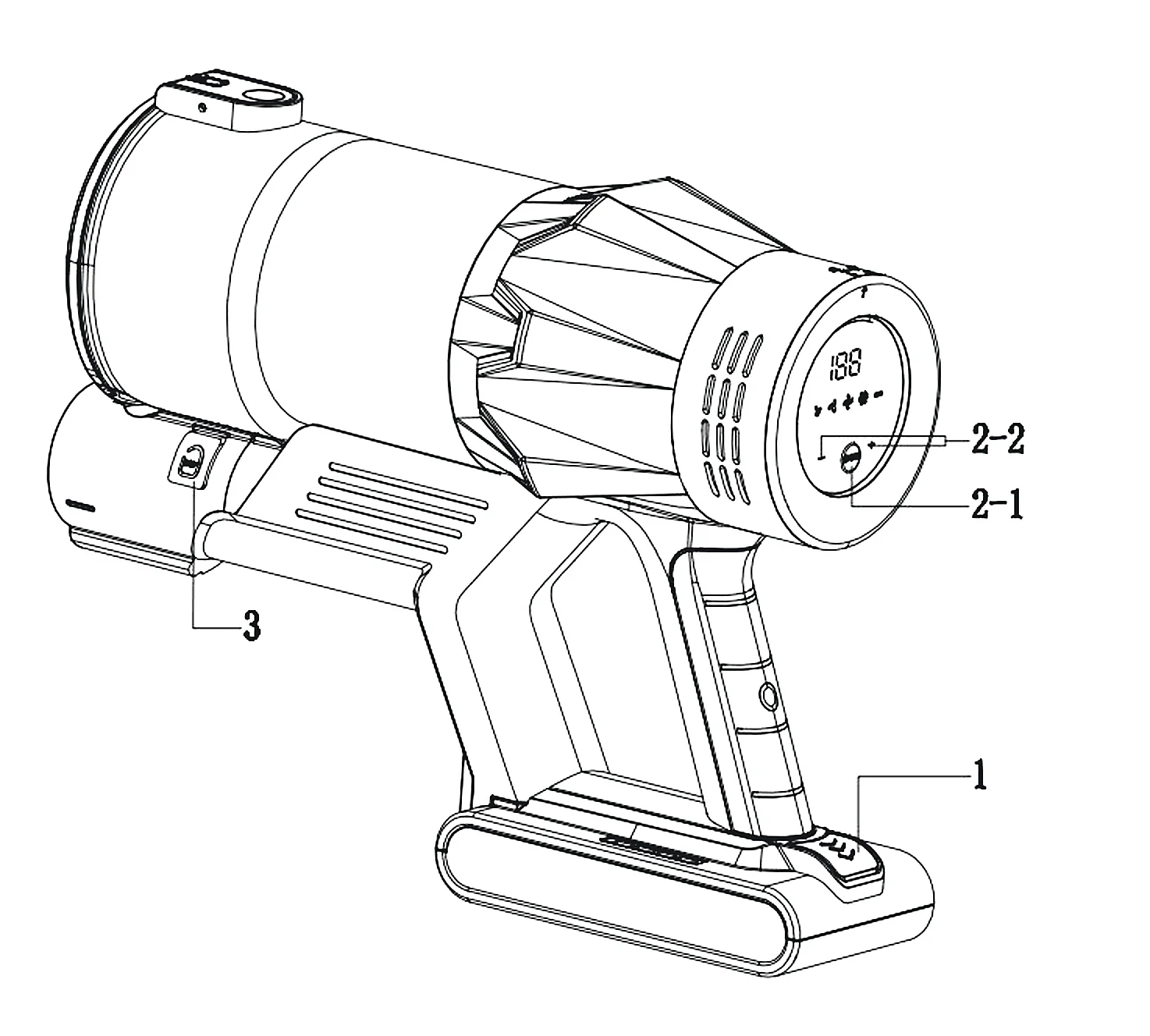
    Press the power button (2-1) to switch on. Press it again to switch off.

  2. Change the mode

    Press – or + (2-2) to move between Eco, Mid and Max. The screen shows which mode is on.

Drawing of the body: 1 the battery, 2-1 the power button, 2-2 the – and + buttons, 3 the dust cup empty button
1 Battery · 2-1 Power · 2-2 – and + · 3 Dust cup empty button
EcoHard floors and most of the house. The quietest mode.
MidRugs and carpet.
MaxShort bursts on heavy mess. It uses the battery fastest.

How long it runs

Up to 60 minutes on one charge. How long you get depends on the mode, the floor and the tool you use. Max drains the battery fastest, as on every cordless vacuum.

The LED headlight

The green lights across the front of the floor head (9) shine low across the floor. They show up fine dust and pale pet hair on hard floors, along skirting boards and under furniture.

Household use only
  • Use it indoors, on dry floors. Never on wet surfaces, and never put it in water.
  • Do not pick up water or other liquids, ash, cigarette ends, broken glass, sharp objects, or fine building dust such as plaster or cement.
  • Switch off before you change the floor head or a tool.
  • Keep the air outlet (10) and the suction opening clear, or the motor can overheat.

All the safety points are in chapter 11.


06

Emptying the dust cup

One button, over the bin. Your hands stay clean.

  1. Switch it off

    Do this before the dust reaches the MAX line on the cup.

  2. Hold it over the bin

    Point the dust cup down into the bin.

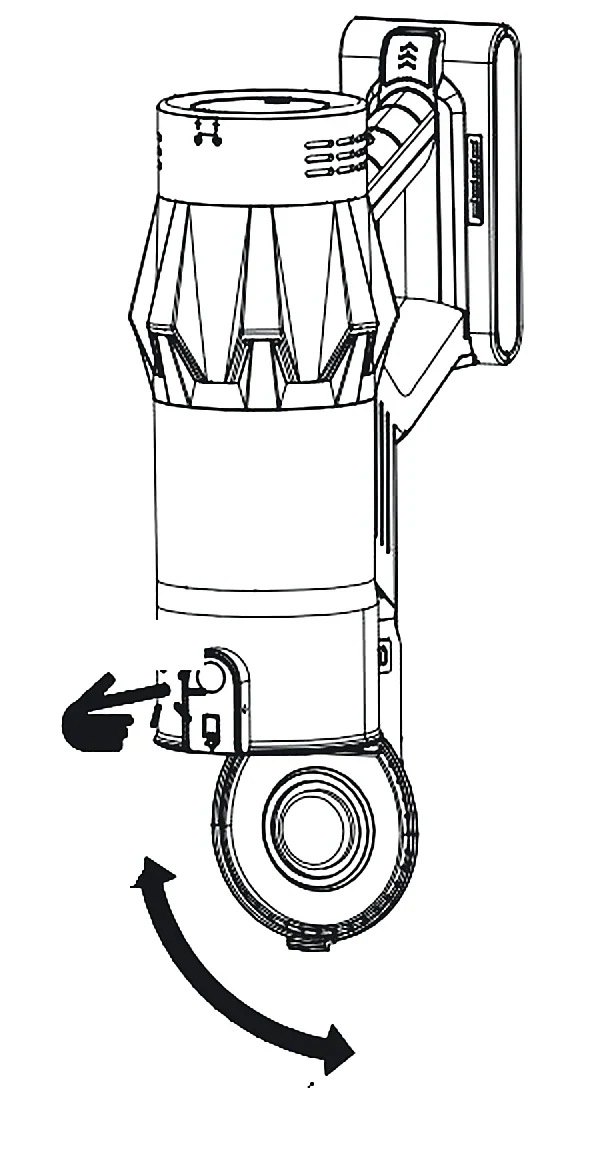
  3. Press the empty button (3)

    The lid at the bottom (4) swings open and the dust falls out.

  4. Close the lid

    Push it shut until it clicks.

Drawing: press the button on the dust cup and the lid at the bottom swings open
Tip

Dust stuck inside the cup comes off with the 2-in-1 brush tool or a dry cloth.

No water

Never rinse the dust cup or the floor head under water. Water can reach the motors and damage them. Wipe them with a dry cloth.

07

Cleaning the filters

About every five runs, and whenever the suction drops.

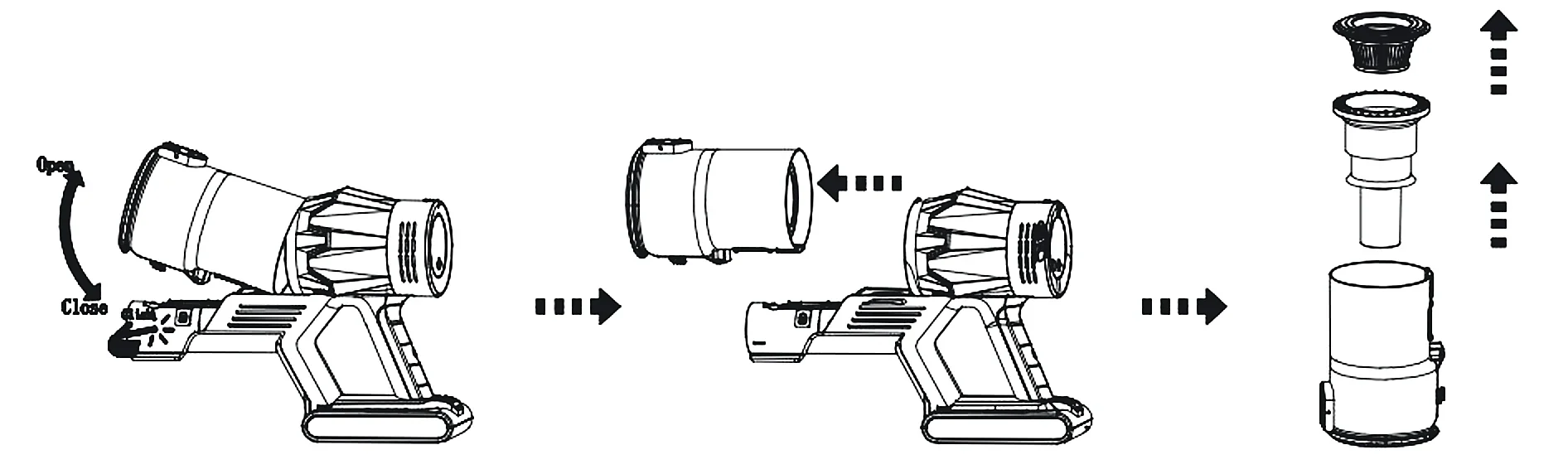
  1. Take the dust cup off

    Switch off. Hold the body and press the dust cup release button (14), then pull the cup away.

  2. Lift the filters out

    Take out the metal strainer, then the HEPA filter, one at a time.

Drawing: the dust cup comes off the body, then the strainer and the HEPA filter lift out
  1. Clean them

    Rinse the metal strainer under cool water. Tap the HEPA filter over the bin and brush the dust off it. When it needs more than that, rinse it in cool water. No soap, no dishwasher.

  2. Let them dry completely

    Leave them to air-dry, away from heaters and direct sun. A damp filter must never go back in. Fit the spare HEPA filter from the box in the meantime.

  3. Put it all back

    Filters in, then the dust cup onto the body until it clicks.

Look after the filter
  • Never run the vacuum without the filter in.
  • Do not bend or squeeze the HEPA filter.
  • If a filter is torn, or the suction does not come back after cleaning, change it. Spare filters stay in stock for 5 years: write to us.

08

Clearing the brush roll

Hair does not need cutting off. String and thread sometimes do.

The V-shaped brush roll strips hair off as it spins, and the suction takes it into the dust cup. String, thread or carpet fibre can still wind round it now and then. If the brush roll alert (b) lights up, or the roll stops spinning, clear it like this.

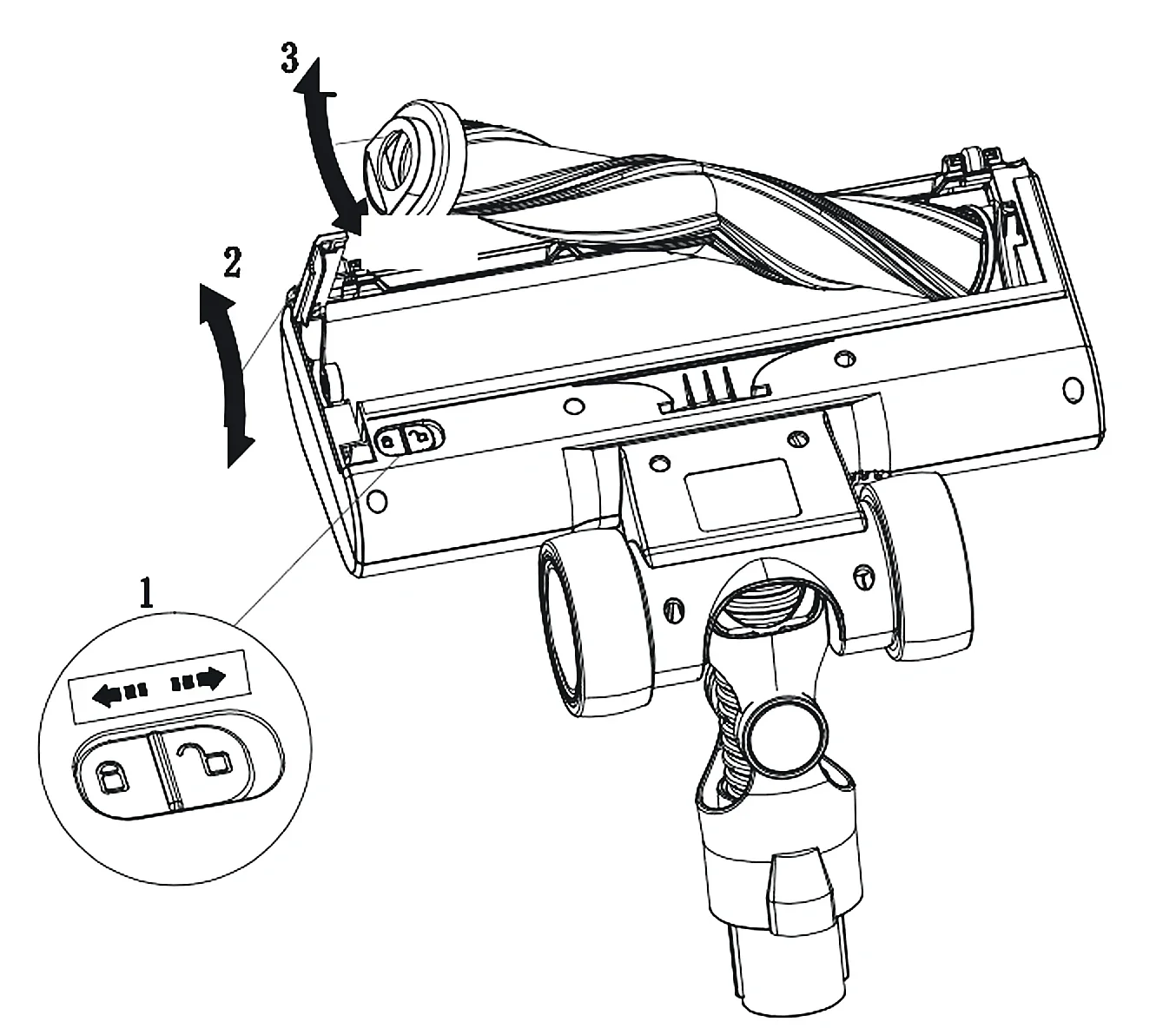
Drawing of the floor head from below: 1 slide the side lock, 2 swing the side cover open, 3 pull the brush roll out
  1. Take the floor head off

    Switch off and press the floor head release button (7). Never clean the floor head while it is on the vacuum.

  2. Unlock the side cover

    Turn the head over. Slide the side lock towards the open padlock (1).

  3. Open it and pull the roll out

    Swing the side cover open (2), then pull the brush roll out by its end (3).

  4. Clear it

    Pull off anything wound round it. For string, cut it with scissors, taking care not to cut the bristles.

  5. Put it back

    Slide the roll back in, close the cover and slide the lock to the closed padlock.

09

Error codes

A code on the screen? Switch off first, then find it here.

E1

Motor overload

Usually a blockage. Clear the floor head, the tube and the dust cup opening, clean the filters, then switch on again.

E2

Motor fault

Stop using it and write to us with your order number. It is covered for 5 years.

E3

Brush roll fault

Take the floor head off and click it back on. If the code comes back, write to us.

E4

Brush roll overload

The brush roll is jammed. Clear it as shown in chapter 08.

E5

Part not fitted

Check that the dust cup, the filters and the floor head are all in place and clicked in.

E6

Too hot

It has switched off to protect itself. Clear any blockage, clean the filters and let it cool down fully before you carry on.

E7

Battery low

Put it on charge.

E8

Battery fault

Take the battery off and fit it again until it clicks. If the code stays, write to us: the battery is covered for 5 years.

F1

Charging voltage too high

Unplug the charger. Use only the charger from the box, plugged straight into a wall socket.

F2

Charging current too high

Unplug the charger. Use only the charger from the box, plugged straight into a wall socket.

Still showing?

Write to contact@shopvekto.com with the code and your order number. Most problems are sorted from that one message.


10

Troubleshooting

Tap a problem to see what to check, in order.

It stops, or it will not start
  • The battery is low: charge it.
  • Something is blocking it: clear the floor head, the tube and the dust cup opening.
  • Something is wound round the brush roll: clear it (chapter 08).
  • A code is on the screen: look it up (chapter 09).
Weak suction
  • The dust cup is full: empty it.
  • The filters are dirty: clean them (chapter 07).
  • The strainer or the filter is missing, or not seated: fit it properly.
  • Something is blocking it: clear the floor head, the tube and the dust cup opening.
  • You are on Eco on a thick rug: try Mid or Max.
The brush roll stops spinning
  • Something is wound round it: clear it (chapter 08).
  • The floor head is not fully on: take it off and click it back on.
The blockage alert (c) is on
Switch off. Take off the floor head and the tube and look through each one towards a light. Check the neck of the floor head and the opening of the dust cup. Push out anything stuck with something blunt, such as a broom handle.
The motor sounds strange
This is almost always a blockage. Switch off and clear it as above. If the sound stays, stop using it and write to us.
The battery will not charge
  • Use only the charger that came in the box.
  • Push the plug fully into the charging port (13) and the charger fully into the wall socket.
  • Check that the socket works with another appliance.
  • Still nothing: write to us. The battery is covered for 5 years.
It runs for less time than before
Max uses the battery much faster than Eco, so check the mode first. Clean the filters and clear the brush roll, because both make the motor work harder. If the battery holds less than 80% of its runtime within 5 years, we send you a new one free.
11

Safety

Read this before the first use, and keep the printed manual.

Electric shock
  • Charge and use the vacuum indoors only.
  • Never open the vacuum, the battery or the charger. Repairs are for us or a qualified repair shop only. Work done by anyone else can cause injury.
  • Before you charge it, check that your mains voltage matches the charger (100–240 V).
  • Never touch the charger, the plug or the vacuum with wet or damp hands.
  • Plug the charger straight into a wall socket, never into an extension lead.
Injury
  • Switch off before you change the floor head or a tool.
  • Do not pick up sharp objects or broken glass.
  • Never pick up anything burning or hot, such as matches, ash or cigarette ends.
  • Do not pick up chemicals, stone dust, plaster, cement or similar fine dust.
  • Do not pick up water or any other liquid.
  • Never use it near flammable or explosive substances, or on aggressive liquids.
  • Take extra care on stairs.
  • Never use it without the dust filter in.
  • Keep the air outlet and the suction opening clear. A blocked air path can overheat and damage the vacuum.
The charger and the cable
  • Use only parts and tools that Vekto recommends.
  • Use the charger only for this vacuum, and charge this vacuum only with its own charger and dock.
  • Never carry the charger or the dock by the cable, and never pull the cable to move them.
  • Unplug by holding the plug, not the cable.
  • Keep the vacuum and the charger away from heaters, ovens and other hot surfaces.
The battery
  • Never throw the battery into a fire or expose it to high heat. It can explode.
  • In extreme conditions a battery cell can leak. If the liquid touches your skin or eyes, rinse with water straight away and see a doctor.
Children and storage
  • Children aged 8 and over, and people with reduced physical, sensory or mental abilities or little experience, may use it if they are supervised or have been shown how to use it safely and understand the dangers.
  • Children must not play with it.
  • Children must not clean or look after it without supervision.
  • Store it indoors, in a dry place.
  • After cleaning it, do not leave it in direct sun or somewhere damp.

12

Specs and recycling

The figures for the V18, and what to do with it at the end.

Model
V18
Motor
550 W, brushless
Suction
55 kPa on Max
Runtime
Up to 60 min per charge
Battery
25.9 V lithium-ion, 7 cells, 2200 mAh
Charge time
4–5 h from empty
Charger input
100–240 V ~ 50/60 Hz
Charger output
31 V ⎓ 500 mA
Charger protection class
II
Dust cup
1.2 L
Filtration
Multi-stage cyclonic, washable HEPA

Recycling

This symbol means the vacuum and its battery must not go in household waste. Take them to a collection point for electrical waste, or write to us and we tell you how to return them. Recycling keeps harmful materials out of the ground and lets the materials be used again.

Still stuck? Write to us.

A person answers, at any hour. Your V18 is covered for 5 years, battery included, and spare parts stay in stock for 5 years.

Write to Us